How to disable data collection on your Kindle or Fire device

|

If you buy an item via this post, we may get a small affiliate fee at no cost to you (details). Some content uses AI assistance (details).

Disable Amazon usage data on Kindle and Fire devices

Change this privacy setting to stop Amazon from collecting your private data for marketing purposes.

Internet users are getting more and more concerned about their privacy. And more and more companies feel obliged to introduce more transparent privacy policy, as well as easy to change settings that enable customers to control what information to share.

Amazon is still far behind Facebook or Google in this area, but you can already decide whether you want the company to collect data about how you use your Kindle e-reader or Fire tablet.

Opting out of data collection doesn’t mean you won’t be able to use your Amazon device the same way as before. Your device will offer the same features, for instance, syncing the last read position between the connected devices. The necessary data will be sent to Amazon servers to provide all features, but the company won’t use it for any other purpose than that.

Please note that this setting can be changed only for a connected Amazon device, and not an app (such as Kindle for iPad and iPhone).

You can disable data collection directly on each device, but the method you see below is the easiest way – you can change the setting for several devices in one place.

How to disable Amazon device usage data collection – the easy way

1. Go to Amazon website and log in to your account.

2. Go to “Account & Lists” area and select “Your Content and Devices” from a drop-down menu.

Stop Amazon from tracking your activity on Kindle and Fire devices

3. In the top navigation bar, on the right of “Manage Your Content and Devices,” click “Privacy Settings.”

How to change privacy settings on Kindle e-reader and Fire tablet

4. Click “Manage Settings” button on the “Amazon Devices Privacy” box.

Select Amazon Devices Privacy

5. Select the device you want to control.

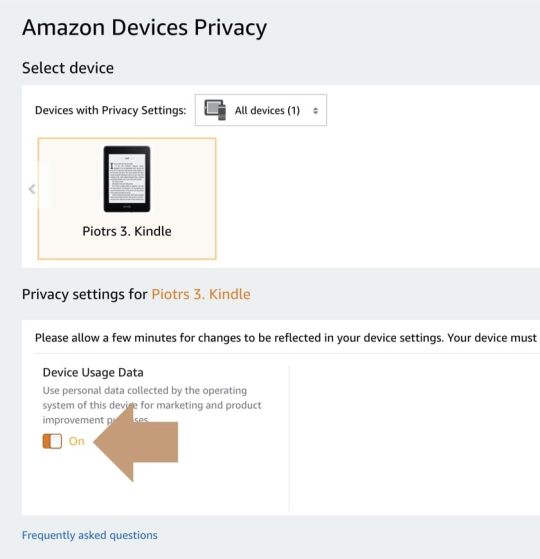
6. In the lower part, uncheck the orange slide button located under the headline “Device Usage Data.”

Disable Amazon usage data on Kindle and Fire devices

7. A dialog box “Turn off Device Usage Data” appears in the center of the screen. Click the orange button saying “Turn off.”

Turn off device usage data on Kindle or Fire through Amazon web dashboard

8. Repeat the same for each device that’s connected to your Amazon account. Done!

• • •

Amazon collects your personal data on the Kindle or Fire device for two main purposes:

  • For marketing – to adjust ads to your personal interests, for instance what screensaver offers you see on your Kindle model with special ads.
  • To improve performance of the device and add new features in the next software updates.

Disabling this option doesn’t mean you get rid of ads on your Kindle or Fire. You will still see them, but they will be unrelated to your interests – which is already a good thing as you will be less likely to buy something you don’t need.

If privacy is something you want to know more about, make sure to read our extended list of what data ebook platforms may collect about you.

• • •

Keep exploring. Here are other tips, lists, and news for thoughtful readers:

If you don’t want to miss future updates, make sure to get our free newsletter. Let’s also connect via WordPress Reader, Tumblr, Facebook or RSS feed.

If you buy an item via this post, we may get a small affiliate fee (details). We only use the cookies that are necessary to run this site properly (details). Some content uses AI assistance (details).

Piotr Kowalczyk Avatar

2 responses

  1. […] may disable data collection on a Kindle, but it will not give you 100% privacy. Some personal data has to be sent to Amazon to let you, for […]

  2. […] I don’t mind sharing what ebooks I read and how. Online services can’t operate without collecting and processing usage data. My problem is that, opposite to Google or social media services, ebook platforms are far behind in developing a transparent privacy policy. For instance, Amazon explains that data is collected for “marketing and product improvements.” […]

Leave a Reply

More to explore

Get only new, carefully curated articles delivered safely to your inbox.

Our newsletters are powered by WordPress Jetpack. Your email is protected by Automattic's secure infrastructure. Unsubscribe whenever you like.

Xteink X3: the ultimate magnetic snap-on pocket e-reader

Looking to attach a lightweight e-reader directly to your smartphone? The Xteink X3 magnetically snaps onto phone cases without blocking camera lenses. This 58g device replaces mindless scrolling with instant reading. ✨ More

★★★★ Our score: 4/5

Start reading

New on Geek Updated

Geek Updated is our sister sister blog, where we share distraction-free tips, lists, and news for thoughtful geeks.

Recent posts

Click & Grow biophilic smart indoor garden for your screen-free zone

Add a touch of quiet nature to your screen-free zone. Featuring an automatic self-watering tank and built-in LED grow light timer, this smart, patented indoor garden lets you grow fresh herbs and plants effortlessly. ✨ More

★★★★ Our score: 4/5

Ebook Friendly

A quiet web corner for thoughtful readers

• • •

Let's connect on Facebook, Pinterest, and Tumblr.
Add us to your WordPress Reader and RSS feed.

Discover more from Ebook Friendly

Subscribe now to keep reading and get access to the full archive.

Continue reading